
Description
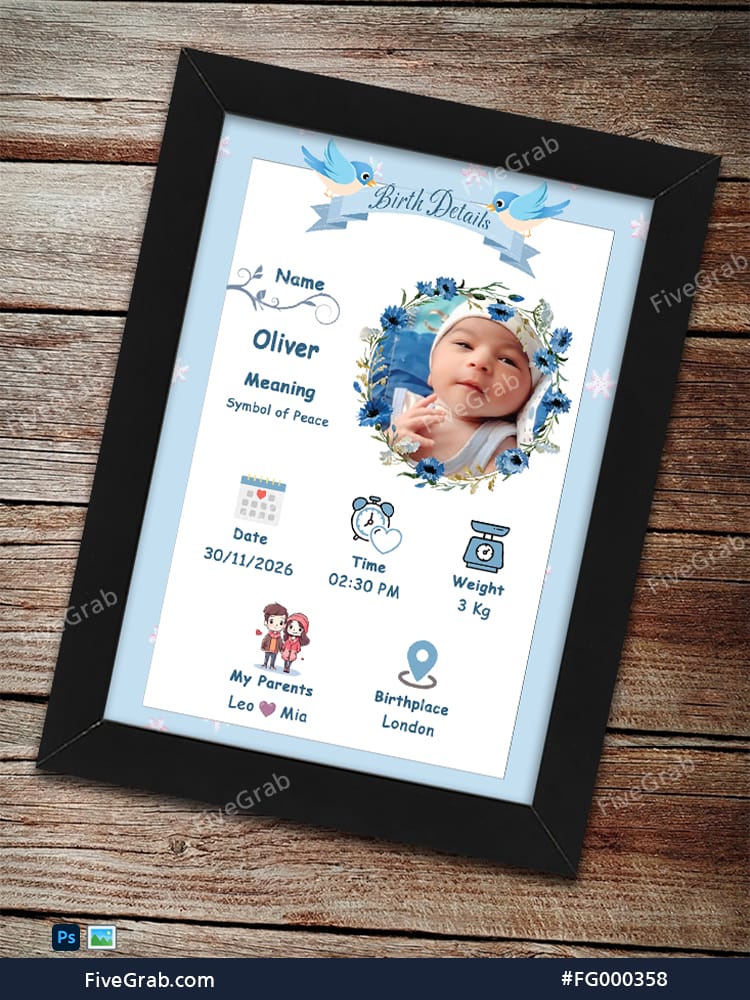
Capturing the arrival of a new family member is a momentous occasion. This premium digital asset from FiveGrab offers the perfect way to commemorate those first precious details. Our high-quality mockup allows you to showcase baby birth statistics in a professional and heartwarming layout.
Introduction: Celebrate Life’s Most Beautiful Beginning
Welcome to FiveGrab, your premier destination for professional digital assets. We understand that parents and gift-givers want to preserve memories in the most beautiful way possible. Consequently, we designed this Birth Details frame to serve as a timeless keepsake. This template bridges the gap between digital convenience and sentimental value.
Specifically, this design highlights everything that makes a baby’s arrival unique. Furthermore, it provides a clean, aesthetic backdrop that fits any nursery decor. Whether you are a professional photographer or a DIY enthusiast, this asset elevates your presentation instantly. Moreover, using a high-quality mockup ensures that your final prints look exactly as intended.
Key Features: Designed for Customization and Quality
Our team at FiveGrab prioritizes functionality and style in every product. You can enjoy several advanced features with this specific template:
- Smart Object Integration: You can drop your baby photo into the floral wreath easily.
- Fully Editable Text: You can change the name, date, and weight in seconds.
- High-Resolution Output: This file ensures crisp, clear lines even when you print it large.
- Professional Color Palette: We use soft blues and floral accents to create a calming vibe.
- Layered Organization: You can navigate the PSD file without any confusion.
- Realistic Textures: The wooden background and black frame provide a tangible, 3D feel.
In addition, the design features charming illustrations like bluebirds and delicate snowflakes. Consequently, the layout feels whimsical and modern at the same time. You can adjust every element to suit your specific aesthetic needs.
Practical Use Cases: Where to Apply This Design
The versatility of this FiveGrab asset makes it suitable for various projects. Specifically, you can use it for the following:
Personalized Nursery Art
You can print this design on high-quality cardstock to hang in a baby’s room. It acts as a focal point for nursery decorations. In addition, it makes a wonderful conversation piece for visiting family members.
Professional Photography Portfolios
If you are a newborn photographer, you can use this mockup to showcase your work. Specifically, you can present “after” photos to clients as a value-added service. Moreover, this helps you upsell physical prints and framed products.
Social Media Announcements
You can export the digital file to share the big news on Instagram or Facebook. This polished look stands out more than a standard smartphone photo. Consequently, your announcement will receive the attention it truly deserves.
Technical Specifications: Built for Professionals
We ensure our files meet industry standards for ease of use. Here are the technical details for this product:
- File Formats: High-resolution PSD (Photoshop) and flat JPG.
- Resolution: 300 DPI for professional printing results.
- Color Mode: RGB (easily convertible to CMYK for print).
- Dimensions: Optimized for standard 8×10 or A4 frame ratios.
- Software Compatibility: Adobe Photoshop CC or newer recommended.
Furthermore, we include a transparent PNG version of the floral wreath for extra flexibility. This allows you to use the design elements across different platforms.
Installation Guide: How to Edit Your File
Editing your FiveGrab template is a straightforward process. Follow these simple steps to get started:
- Open the File: Load the PSD file into your Adobe Photoshop software.
- Locate the Smart Object: Look for the layer labeled “Your Photo Here.”
- Replace the Image: Double-click the thumbnail and paste your baby’s photo.
- Save and Close: Save the smart object tab to see the photo appear in the wreath.
- Edit the Text: Select the Type Tool (T) and click on the names or dates.
- Export Your Work: Save your final masterpiece as a high-quality JPG or PDF.
In addition, you can toggle the background layers if you prefer a different wood texture. Specifically, our layered system gives you total creative control.
Download Package Specifications
- Compact ZIP Format: Specifically, you will receive your digital assets within a high-quality ZIP file.
- File Size: The total package size is exactly 20 MB for quick and easy downloading.
- Included Font List: In addition, we provide a document containing all font names used in this layout.
- Software Compatibility: Specifically, you must use Adobe Photoshop to edit and customize this template.
- Layered PSD Structure: Furthermore, you can modify every element easily within the professional Photoshop environment.
- Copyright Notice: Consequently, all design rights remain strictly reserved by FiveGrab.
- Usage License: Specifically, this purchase grants you a license while FiveGrab maintains full intellectual property ownership.


chemistry1science
April 1, 2026very nice