
Description
Introduction: Why This Asset Matters
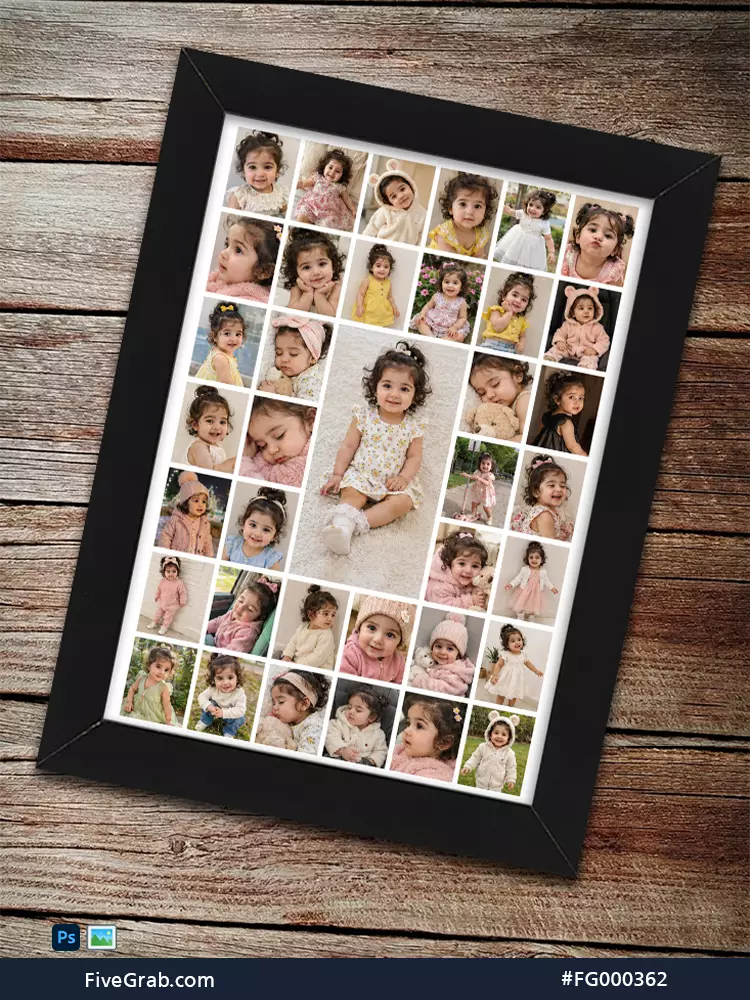
Turn treasured childhood moments into one beautiful display with this kids photo collage frame mockup. The design combines many photographs inside one elegant black frame. Therefore, you can present an entire memory collection without creating separate layouts.
Parents often capture hundreds of meaningful moments. However, those photographs usually remain scattered across phones, folders, and social platforms. This template solves that problem. It helps you organize many images inside one balanced and attractive composition.
The collage features several small photo areas around one larger central photograph. Consequently, the main image receives strong visual attention. The surrounding photographs support the story and create a rich timeline.
Moreover, the realistic wooden background adds warmth and character. The black frame creates a clean contrast against the natural surface. Therefore, the final presentation suits both modern and traditional interiors.
FiveGrab offers this premium asset for designers, photographers, parents, and gift creators. You can use it for personal projects or professional product presentations. Furthermore, the organized collage style saves valuable design time.
Key Features
Elegant Multi-Photo Layout
The template provides numerous photo spaces in different sizes. Therefore, you can combine portraits, outfits, events, and everyday memories.
The large central area highlights your favorite photograph. Meanwhile, smaller frames create visual variety around it. This arrangement keeps the composition interesting and easy to explore.
Realistic Frame Presentation
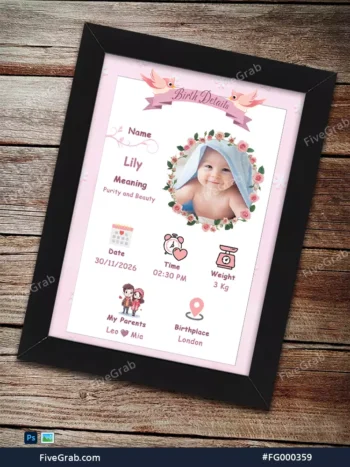
The design shows the collage inside a realistic black picture frame. Moreover, the frame includes natural angles, shadows, and depth. These details create a professional mockup effect.
The wooden background adds a warm lifestyle setting. In addition, it helps customers imagine the finished product inside a real home.
Flexible Photo Placement
You can replace the sample photographs with your own pictures. Specifically, you can add baby photos, family portraits, wedding images, or travel memories.
The varied photo sizes support both close-up portraits and full-body photographs. Consequently, you can create a complete visual story.
Professional and Balanced Composition
The design uses clear white spacing between each photograph. Therefore, every image remains visible and separated.
Moreover, the grid keeps the collage organized. The central image also provides a strong focal point. As a result, the design never feels random or crowded.
Premium FiveGrab Quality
FiveGrab provides creative assets for practical commercial and personal projects. Furthermore, this template supports fast editing and professional presentation.
You can adapt the design for several themes. For example, you can create birthday gifts, family posters, or photography previews. Therefore, one file can support many different products.
Practical Use Cases
Baby and Childhood Memory Collages
Use the design to present a child’s growth journey. For example, add monthly photographs from birth through the first year. Moreover, you can include birthdays, first steps, holidays, and family celebrations.
The large center image can show the child’s latest portrait. Meanwhile, the smaller photographs can show earlier stages.
Personalized Family Gifts
Create thoughtful gifts for parents, grandparents, and relatives. Specifically, you can prepare framed collages for birthdays, Mother’s Day, or Father’s Day.
Furthermore, the design works well for newborn celebrations and baby showers. A personalized collage adds emotional value to every occasion.
Photography Studio Presentations
Photographers can use this mockup to present package options. Therefore, clients can preview several photographs inside one final layout.
In addition, studios can display family sessions, children’s sessions, and birthday photography. The realistic frame helps customers understand the finished product.
Social Media and Online Store Promotion
Use the template to promote custom photo collage services. Moreover, you can share the finished design on Instagram, Facebook, Pinterest, or your website.
Online sellers can display personalized frame products with a professional preview. Consequently, customers can understand the product before placing an order.
Scrapbooking and Digital Keepsakes
Digital scrapbook creators can use this layout as a memory page. Furthermore, users can add captions, dates, names, or short messages.
You can also export the completed collage as a digital gift. Therefore, customers can share it through email or messaging applications.
Technical Specifications
File Details
- Primary file format: PSD, as indicated within the preview image
- Preview image dimensions: 750 × 1000 pixels
- Preview orientation: Portrait
- Design style: Multi-photo collage frame mockup
- Main frame color: Black
- Background style: Rustic wooden surface
- Photo arrangement: Multiple small images with one central feature image
- Editing requirement: Adobe Photoshop or a compatible PSD editor
- Export options: JPG, PNG, PDF, or other supported formats
- Color mode: Confirm the included source file before professional printing
The source package may contain editable layers, masks, or Smart Objects. However, the exact layer count may vary. Therefore, review the included files after downloading.
Moreover, you should check the final resolution before large-format printing. The shown preview measures 750 × 1000 pixels. However, the original PSD may contain different working dimensions.
Installation and Editing Guide
How to Edit the PSD File
First, download the product files from FiveGrab. Then, extract the ZIP folder when the package uses compression.
Next, open the PSD file in Adobe Photoshop. You can also use Photopea or another PSD-compatible application. However, Photoshop usually provides the best layer support.
After opening the file, locate the Layers panel. Look for named photo layers, masks, or Smart Objects. Then, select the first photo area.
If the file uses Smart Objects, double-click the Smart Object thumbnail. Next, place your photograph inside the opened window. Resize the image until it fills the complete area.
Afterward, save the Smart Object window and close it. Photoshop will update the collage automatically. Repeat these steps for every remaining photo area.
If the template uses masks, place each photograph above the correct mask. Then, create a clipping mask. Consequently, the photograph will fit inside the selected shape.
Furthermore, adjust brightness and contrast when photographs have different lighting. You can also apply similar color settings across all images. Therefore, the collage will look consistent and professional.
Finally, save an editable PSD copy. Then, export the finished design as JPG or PNG. Choose PDF when you need a print-ready sharing format.
Download Package Specifications
- Compact ZIP Format: Specifically, you will receive your digital assets within a high-quality ZIP file.
- File Size: The total package size is exactly 3 MB for quick and easy downloading.
- Included Font List: In addition, we provide a document containing all font names used in this layout.
- Software Compatibility: Specifically, you must use Adobe Photoshop to edit and customize this template.
- Layered PSD Structure: Furthermore, you can modify every element easily within the professional Photoshop environment.
- Copyright Notice: Consequently, all design rights remain strictly reserved by FiveGrab.
- Usage License: Specifically, this purchase grants you a license while FiveGrab maintains full intellectual property ownership.


chemistry1science
June 14, 2026Beautiful product, I liked it